There is always a distinct thrill in learning something new and immediately putting it to the test. My journey with Model Context Protocol (MCP) servers began with a basic ‘books API’ demo, but I quickly wanted to take it a step further and build something with real-world utility. Since I enjoy working with Keycloak, I thought: Why not create an MCP server for it?
The vision was simple: enable developers to just ‘chat’ with Keycloak. There are so many standard tasks—setting up new users, groups, clients, and browser workflows—that could be streamlined through conversation. For those unfamiliar, Keycloak is an open-source identity and access management solution. I released the first experimental version this past summer, and since then, the wave of constructive community feedback has been incredible. That momentum is exactly what gets me excited to keep building.
In the latest drop i.e. 0.3, I am now moving towards production use cases.
- User JWT Token Authentication: Each user authenticates with their own Keycloak credentials, ensuring proper permission enforcement. For example, a user needs to acquire a token from keycloak inorder to manage it. For local more un-restrictive use, login/pass can be used.
- Move from stdin to SSE. Which also enables easier deployment into a kubernetes env.
- Support for secrets and configMaps. So those deployments can also be managed via MCP.
- And the more fun experiment was moving to just 1 Tool, reducing the 45 tools and still keeping those operations intact. This demands a post of itself, which I plan to write very soon ;)
- Containerized: Available as container images with multi-architecture support. While I am still building the native images, there is an apetite for Docker as well
- The server now has proper health checks, Prometheus metrics, container-ready configuration, and production security defaults.
Vision
Keycloak is the backbone of authentication for countless applications. But administering it often means:
- Context-switching — Leave your IDE, open the admin console, find the right realm, navigate to users, click through forms
- Remembering syntax — Was it
kcadm.sh create usersorkcadm.sh add-user? What were the required fields again? - Repetitive tasks — Create test user #47, add to group, assign role, repeat
For developers already using AI assistants in their workflow, this friction adds up.
What if managing Keycloak was as simple as asking?
“Create a user alice@example.com in the quarkus realm and add her to the developers group… create a client with url:..”
No admin console. No CLI commands to remember. No context-switching. Your AI assistant becomes your Keycloak admin interface.
That’s what the Keycloak MCP Server enables—a bridge between AI assistants and Keycloak’s powerful identity management capabilities.
What is Keycloak MCP Server today?
The Keycloak MCP Server is an open-source Model Context Protocol (MCP) server that exposes Keycloak administration to AI assistants like Claude, Cursor, and any MCP-compatible client.
Instead of navigating the Keycloak admin console or writing scripts, you describe what you want in natural language. The AI translates your intent into API calls, executes them against your Keycloak instance, and reports back.
45+ operations across:
- User management (create, update, delete, password reset, email verification)
- Realm configuration
- Client management (OIDC/SAML clients, secrets, roles)
- Role and group assignments
- Identity provider configuration
- Authentication flow customization
All through conversation.
Quick Start
1. Configure an MCP server client
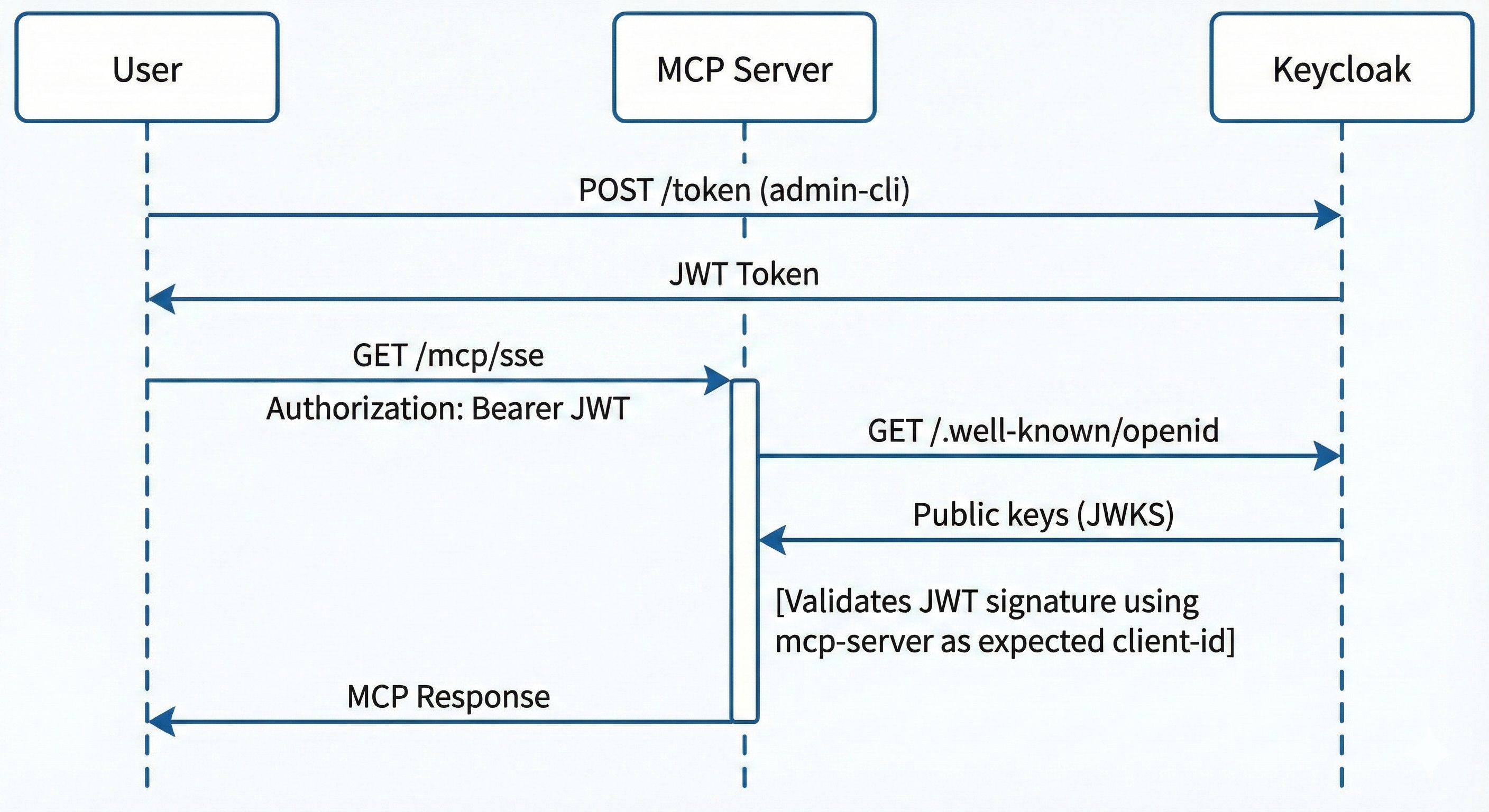
The MCP server uses two different clients for two different purposes:
| Purpose | Client | Who Uses It |
|---|---|---|
| Token Acquisition | admin-cli | Users getting their JWT token |
| Token Validation | mcp-server | MCP server validating incoming tokens |
The key is application-type=service - this means the MCP server acts as a Resource Server that:
- Receives Bearer tokens in the Authorization header
- Validates those tokens against Keycloak’s OIDC endpoints
- Uses Keycloak’s public keys to verify token signatures
The mcp-server client should be configured as a public, service-type client:
{
  "clientId": "mcp-server",
  "enabled": true,
  "publicClient": true,
  "standardFlowEnabled": false,
  "directAccessGrantsEnabled": false,
  "serviceAccountsEnabled": false,
  "bearerOnly": false,
  "protocol": "openid-connect"
}
The flow in practise:
2. Run the Server
docker run -d \
  --name keycloak-mcp-server \
  -p 8080:8080 \
  -e KC_URL=https://KEYCLOAK_URL \2
  -e KC_REALM=master \
  -e OIDC_CLIENT_ID=mcp-server \
  quay.io/sshaaf/keycloak-mcp-server:latest
2. Get Your Token
Each user authenticates with their own Keycloak credentials:
export ACCESS_TOKEN=$(curl -sk -X POST \
>   "https://KEYCLOAK_URL/realms/master/protocol/openid-connect/token" \
>   -H "Content-Type: application/x-www-form-urlencoded" \
>   -d "grant_type=password" \
>   -d "client_id=admin-cli" \
>   -d "username=USERNAME" \
>   -d "password=PASSWORD" | jq -r '.access_token')
3. Configure Your MCP Client
Add to your Cursor IDE config (~/.cursor/mcp.json):
Remmeber to replace TOKEN with your token and the KEYCLOAK_URL with the actual URL.
{
  "mcpServers": {
    "keycloak": {
      "transport": "sse",
      "url": "KEYCLOAK_URL/mcp/sse",
      "headers": {
        "Authorization": "Bearer TOKEN"
      }
    },
  }
}
4. Start Asking
In Cursor chat or Claude:
List all users in the master realm
Create a client named "my-app" with redirect URI https://myapp.com/callback
Show me all authentication flows in the quarkus realm
User Management
“Create a user john.doe with email john@company.com, add him to the engineering group, and assign the developer role”
“How many users are in the production realm?”
“Reset the password for user alice and send her a verification email”
Client Configuration
“Create an OIDC client for my React app with redirect URI http://localhost:3000/*”
“Generate a new client secret for the backend-service client”
“What clients exist in the quarkus realm?”
Debugging Auth Flows
“Show me the browser authentication flow and its executions”
“What identity providers are configured in this realm?”
Exploring the Community
“Search Keycloak Discourse for LDAP federation best practices”
Deployment Options
Example deployment files
- docker-compose for local use with http
- k8s/OpenShift deployment post operator installation.
Container (Docker/Podman)
You can also just pull the docker image as follows.
docker pull quay.io/sshaaf/keycloak-mcp-server:latest
OpenShift/Kubernetes
oc apply -f deploy/openshift/
The full manifests included with ConfigMaps, health checks, and TLS support.
Another option is to just use the native binary from the releases.
Development Mode
git clone https://github.com/sshaaf/keycloak-mcp-server.git
cd keycloak-mcp-server
mvn quarkus:dev
Hot-reload enabled. Auth disabled for convenience.
What’s Next?
This is just the beginning. On the roadmap:
- OpenShift IDP Integration — Configure Keycloak as identity provider for OpenShift clusters
- Bulk Operations — Create users from CSV, batch role assignments
- Realm file import - Easier way to just import and export realm files.
A warm welcome to any ideas :)
Built With ❤️ for the Keycloak and Java communities.
- Quarkus — Supersonic Subatomic Java
- Keycloak Admin Client — Official Java client
- MCP Protocol — Model Context Protocol
- GitHub Releases - Linux, Mac, Windows
- SSE Transport — HTTP-based Server-Sent Events for modern connectivity